
Please enter the terms you'd like to search.
Never Manually Copy an Email Into a Quote Again
Customer inquiries don't always arrive through your form, some come straight to your inbox. Incoming Emal automatically turns incoming emails and attachments into organized quote requests, so nothing gets lost between your inbox and your dashboard. Available as a separate add-on for both Community and Pro.
Turn Customer Emails Into Quote Requests Instantly
Initiate the process of receiving requests for quotation (RFQ) through emails in a matter of minutes with the Request a Quote Email Addon. Some of its key highlights include:
File Attachments:
- Receive customer file attachments directly through email submissions, ensuring comprehensive information capture.
Anti-Spam Measures:
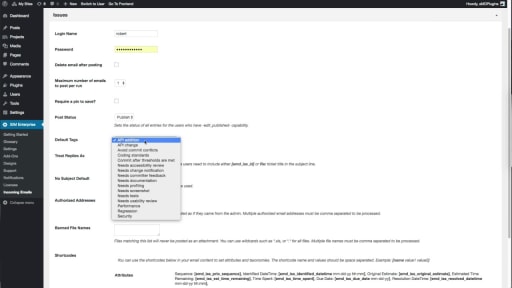
- Implement robust measures to reject spam or unauthorized RFQ requests, including email pins, authorized addresses, and the exclusion of banned file names.
Email Retrieval Options:
- Retrieve RFQ emails from IMAP or POP3 servers, with or without SSL/TLS, providing flexibility in email source management.
Scheduled Email Checks:
- Set the frequency at which you want to check your emails for incoming RFQ submissions, customizing the process to meet your needs.
Email Deletion Options:
- Choose whether to delete incoming emails used for creating RFQs, streamlining your email inbox management.
Request Limit Settings:
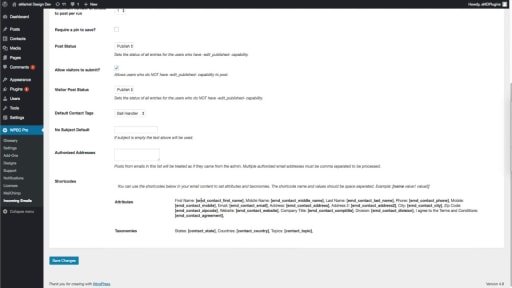
- Set a maximum number of emails for RFQ requests, controlling the volume of submissions based on your preferences.
User Accessibility Options:
- Specify whether visitors, site users, or both can request quotes, tailoring the accessibility based on your site's user management.
Default Subject Line:
- Set a default subject line for RFQs in case customers do not include one, ensuring consistent and organized email submissions.
Separate Status Settings:
- Define separate request for quotation statuses for site users and visitors, facilitating efficient categorization and management.
Shortcode Categorization:
- Categorize emails using shortcodes, allowing for systematic organization and easier tracking of RFQ submissions.
Logging Capabilities:
- Record email processing logs for testing and debugging purposes, providing transparency and aiding in the troubleshooting process.
These features collectively make the Request a Quote Email Addon a powerful tool for seamlessly integrating and managing RFQ submissions through emails.

Save Time on Quotes: Get the Incoming Email Addon Today!
Eliminate the time-consuming task of manually sorting through emails to identify and extract quote requests.